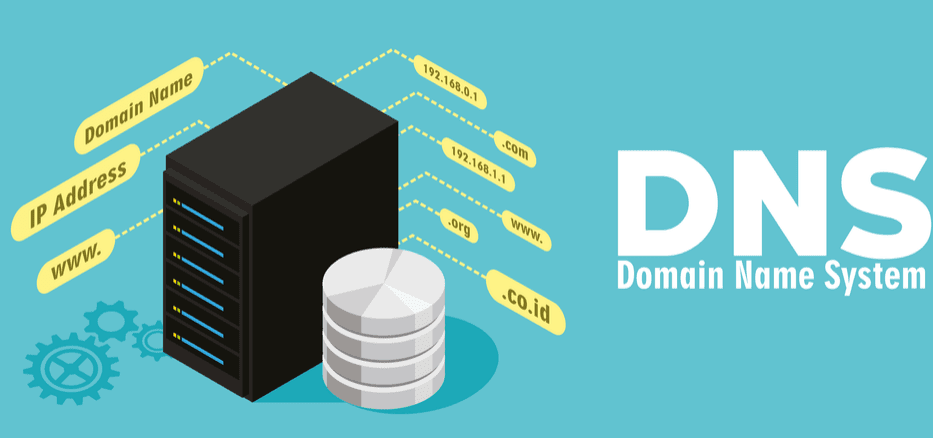
Every time you open a website, a process related to the Domain Name System (DNS) runs in the background. It is responsible for converting the resource’s human-readable domain name into a digital IP address that machines can understand. As a rule, this process happens unnoticed and without failures. However, there is an important nuance: standard DNS can reveal information about the sites you visit to outside observers. To maintain anonymity on the network and protect the details of your Internet activity, it is worth paying attention to the use of the “Private DNS” function. But what exactly is its advantage in terms of privacy? And how to activate it correctly on different devices?
In this article, we will examine in detail how private DNS helps to strengthen your digital security and explain step by step how to set it up for the most secure Internet surfing.
- What is a personal DNS server
- How does your own DNS server work?
- Options for using a personal DNS server
- Benefits of Using a Personal DNS Server
- Enhanced privacy protection
- Blocking DNS spoofing
- Limit Tracking
- Types of Private DNS Server Architectures
- On-premises DNS server within an organization
- Cloud Private DNS Server
- Hybrid Private DNS Server
- Private DNS with Split Horizon
- Personal DNS Protocols
- DNS over TLS (DoT)
- DNS over HTTPS (DoH)
- DNSCrypt Protocol
- DNS via QUIC protocol
- Should I disable personal DNS or leave it in automatic mode?
- Is Personal DNS the Same as VPN?
- Best choice with free DNS or VPN with personal DNS
What is a personal DNS server
A personal (or private) DNS server is a solution that you set up and control yourself, as opposed to regular DNS servers that are automatically provided by your Internet Service Provider (ISP). Typically, unless you have made any changes to your DNS settings, your home network uses your ISP’s DNS servers by default. And when you connect to corporate or public Wi-Fi networks, your DNS requests are handled by those networks’ infrastructure. However, creating your own DNS server provides significant advantages. Not only does it encrypt all DNS requests, but it also significantly increases the level of anonymity on the Internet. As a result, neither your ISP nor outside observers will be able to track which websites you visit.
However, it is worth remembering that complete anonymity is not possible only through DNS protection. Even with a private server, certain data about your activities can be obtained from the IP addresses to which connections are established. Therefore, for the most reliable digital security, it is recommended to use a personal DNS in combination with a VPN service – this will provide comprehensive protection against tracking and data leaks.
The process unfolds like this: a user types a website URL into their browser’s address bar, which triggers the computer to send a DNS request to a DNS server to look up the corresponding IP address. These DNS servers play a crucial role by translating user-friendly domain names into machine-readable IP addresses. For example, the popular site NordVPN uses the domain name nordvpn.com, which links to the numerical IP address 104.19.159.190.
Typically, the act of sending DNS requests to DNS servers isn’t encrypted, leaving them vulnerable. This lack of encryption means that an internet service provider or any curious information seeker could easily intercept these requests and see which websites users are visiting. Such transparency can be concerning for those who value their privacy. In contrast, utilizing a personal DNS server provides an added layer of security. This server encrypts the requests, establishing a safe pathway that effectively conceals this sensitive information from prying eyes, ensuring a more private browsing experience.
How does your own DNS server work?
When it comes to online privacy, a personal DNS server is a key player in protecting our digital footsteps. It doesn’t just process DNS requests — it does so through an encrypted tunnel, greatly increasing security. Let’s take a look at how this works using a concrete example — trying to open the 1xVPN website.
- It all starts with the user entering the domain — 1xvpn-official.com — into the browser’s address bar, wanting to go to the site.
- The operating system initiates a DNS request — “What is the IP address for this domain?”
- This is where a personal DNS server comes into play. Instead of sending the request directly through regular Internet traffic, it wraps it in an encrypted tunnel (such as DNS over HTTPS or DNS over TLS). This means that no one, including your ISP, can spy on what sites you visit.
- The encrypted request is sent to a DNS server – this can be either your own server or a trusted third-party provider, such as Cloudflare or Google DNS.
- The resolver identifies the IP address associated with 1xvpn-official.com and generates a response.
- The DNS response is also transmitted via a secure channel back to your computer. Thus, both the request and the response are not visible to outsiders.
- The operating system transmits the received IP address to the browser, which prepares to establish a connection.
- The browser sends an HTTP(S) request to the received IP, and direct interaction with the 1xVPN server begins.
- The server responds by transmitting HTML, images, scripts – all the necessary content.
- The browser collects the received data and displays a full page on the user’s screen.
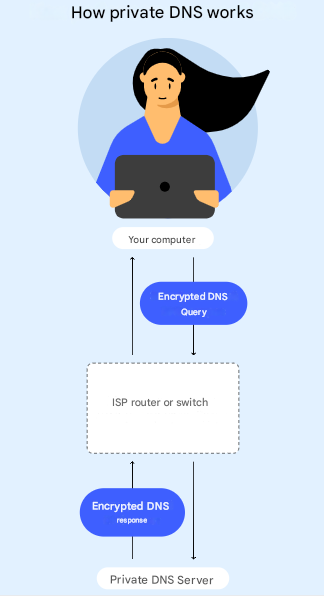
When you start using a private DNS server from an Internet service provider, it is still able to forward network requests and responses, as this is embedded in the architecture of its service. However, by encrypting DNS requests, the provider loses the ability to track the specific domain names that the user accesses.
It can still look at the fact that the device is connected to the DNS server and record requests to IP addresses, it will no longer be able to determine which sites or domains are opened. This encryption greatly enhances the protection of personal information, hiding the behavioral characteristics of the user at the level of the domain name system. This approach protects a higher level of digital anonymity and reduces the possibility of surveillance, allowing you to use the Internet freely and without unnecessary worries about privacy in the conditions of the advancing digital world.
Options for using a personal DNS server
A private DNS server is particularly advantageous for mobile devices, especially if you often switch between different networks throughout the day. To ensure an additional layer of security and privacy, it’s highly recommended to configure the “Private DNS” mode on smart home devices as well, which can greatly enhance your overall online experience.
- Private DNS on Mobile Devices: When you activate the “Private DNS” mode, your mobile device will encrypt DNS queries, whether you’re using mobile data or connecting to public Wi-Fi networks. This means that in both situations, your online activities will remain confidential and protected from prying eyes. For instance, setting up a personal DNS on Android devices is straightforward and can significantly boost your browser’s security, making your internet browsing experience safer and more private.
- Modern Internet of Things (IoT) devices actively interact with external servers via DNS queries. Implementing your own DNS server can significantly enhance the security of smart devices such as video cameras, multimedia speakers, and climate control systems. This solution minimizes the risks associated with DNS attacks and other digital threats, providing a higher level of privacy and security for the user.
- Many marketing and analytics platforms use DNS queries to track online activity and build user behavioral profiles. By encrypting these queries and redirecting them through a private DNS server, you can prevent the leakage of personal data. This approach significantly complicates the collection of information about actions on the Internet, reduces the aggressiveness of targeted advertising, and makes interaction with online services more private and comfortable.
Along with utilizing a private DNS, it’s beneficial to occasionally switch your DNS servers for better performance. You can easily do this in your device’s network settings. Various DNS servers can significantly improve website speed, privacy, and overall browsing performance. However, a private DNS server provides much stronger security and protection for your data. We will explain why this matters further.
Benefits of Using a Personal DNS Server
Using a private DNS is one of the most effective ways to prevent phishing attacks and hide your online activity from third-party surveillance.
Enhanced privacy protection
The main advantage of switching to a private DNS server is reliable protection of personal information. Activating this feature on your device means that Internet access providers, as well as any third parties, will no longer be able to track which sites you visit. All DNS requests are transmitted in encrypted form, which minimizes the likelihood of leaking personal data and tracking your online activities.
Blocking DNS spoofing
In addition to privacy, a private DNS effectively protects against DNS spoofing attacks – a method in which attackers redirect users to fake sites. Thanks to encryption, interference with DNS traffic becomes virtually impossible: hackers lose access to the mechanism for spoofing addresses, and you – an additional guarantee of security.
Enabling private DNS doesn’t just improve your digital security, it also makes your web surfing safer and more relaxing. By protecting your personal data and blocking cyber threats, you gain confidence that your online experience is truly under your control – and yours alone.
Limit Tracking
Many ISPs regularly analyze their customers’ DNS requests to track their online activities and build detailed digital dossiers. Using a private DNS server helps to disrupt this surveillance mechanism, as it masks outgoing requests and limits ISPs’ access to information about user behavior. This reduces the amount of personalized advertising and reduces the influence of algorithms that adjust content to the user’s habits and interests when surfing the web.
Types of Private DNS Server Architectures
Personal DNS server architectures cover various approaches to their deployment and administration. The most common models include on-premises, cloud, hybrid, and fully isolated solutions.
On-premises DNS server within an organization
A local personal DNS server is deployed within the company’s infrastructure and is completely under its control. Unlike cloud or external providers, in this case all requests are processed exclusively within the corporate network. This approach significantly reduces the risks of third-party interference and data leakage. The organization gains full control over domain name resolution processes and can flexibly manage access to resources. An additional benefit of a local server is an increase in the level of security, response speed, and overall system stability, especially if the configuration is adapted to specific business requirements.
Cloud Private DNS Server
Private cloud DNS servers are provided by specialized companies that provide secure DNS query processing using encryption and hosting on secure cloud platforms. Using an individual DNS provider significantly simplifies management, and also significantly enhances the security, privacy of data and overall efficiency of the DNS system.
Such services, as a rule, rely on a wide network of servers distributed around the world, which reduces delays when accessing web resources and ensures reliable, stable access to the Internet. In addition, the provider takes on all aspects of the configuration and subsequent maintenance of the DNS infrastructure, eliminating the need for the user to independently solve technical problems and maintain the system in working order.
Hybrid Private DNS Server
A hybrid private DNS merges local DNS servers with cloud-based DNS services, allowing organizations to effectively manage their internal traffic locally while also leveraging advanced cloud security and filtering for external requests.
This combination is truly ideal, as it empowers users with complete authority over their internal DNS management while ensuring robust safety through cloud DNS. A hybrid private DNS not only delivers rapid and efficient handling of internal traffic but also encrypts and protects external requests from a variety of potential threats, enhancing overall security and performance. This dual approach fosters both control and security, making it a smart choice for modern organizations.
Private DNS with Split Horizon
A private DNS server with split-horizon functionality implements a mechanism whereby responses to DNS queries are generated depending on the source of the query — an internal corporate network or the external Internet space. This architecture is widely used by companies to ensure that only employees from the internal network have access to internal resources, which helps to create a secure IT environment.
External users are provided with publicly available versions of services, allowing them to organize control over external access and avoid leaks. This approach not only enhances the protection of confidential data, but also minimizes the risk of intruders.
Moreover, internal routing of DNS queries allows employees to access local services faster, bypassing external DNS nodes. This helps to speed up the system response and improve the user experience within the organization, increasing the overall performance of the network infrastructure.
Personal DNS Protocols
Personal DNS protocols play a key role in protecting and securing DNS queries by encrypting them as best they can as they travel across the vast Internet. These protocols block interception and monitoring of DNS queries and activities by third parties, including Internet service providers and data crawlers.
DNS over TLS (DoT)
DNS over TLS (DoT for short) offers enhanced privacy protection by wrapping DNS queries in a secure channel using the Transport Layer Security (TLS) protocol, the same protocol used to encrypt HTTPS connections. This ensures that every DNS query is encrypted, making it impossible for third parties to intercept or analyze it. This is especially true on public Wi-Fi networks, where unsecured queries can easily become prey for attackers. Using DoT helps provide users with peace of mind when surfing the web, as their queries remain hidden from unwanted surveillance and analysis.
DNS over HTTPS (DoH)
An alternative approach, DNS over HTTPS (DoH), has similar goals, but operates differently: DNS queries are transmitted inside standard HTTPS traffic. This makes them virtually indistinguishable from regular web requests, making them difficult for third parties to filter and monitor. This method not only enhances privacy protection, but also helps circumvent censorship and network restrictions by masking DNS traffic among ordinary Internet exchanges. DoH is becoming a key element of the modern approach to Internet privacy, allowing users to maintain privacy even in the face of aggressive network control.
DNSCrypt Protocol
DNSCrypt safeguards DNS queries using its proprietary protocol, effectively preventing interception or unauthorized modification. It places a strong emphasis on authenticating DNS responses, ensuring they come from a trusted DNS server and remain untouched by any malicious entities. This protocol proves particularly beneficial when both privacy and robust protections against spoofing or unauthorized access to DNS are critical for users.
DNS via QUIC protocol
DoQ (DNS over QUIC) is not just another way to protect DNS queries, but a whole generation of network security based on the revolutionary QUIC protocol. It is designed as an alternative to traditional TCP, providing both a fast connection and internal encryption. Thanks to this, DNS queries pass over the Internet not only faster, but also practically impenetrable to prying eyes. The main strength of DoQ is in reducing latency and high resistance to data loss. Even under unstable network conditions, it maintains a smooth connection, protecting stable and secure access to domain names. Along with DoQ, there are other modern protocols that increase privacy – such as DoH (DNS over HTTPS), DoT (DNS over TLS) and DNSCrypt. They all aim to one thing: hide your DNS queries from ISPs, attackers and outsiders.
Should I disable personal DNS or leave it in automatic mode?
There is simply no clear answer to the question of whether to disable private DNS or switch it to automatic mode. It all depends on your individual preferences and the specific network environment you are in.
In most cases, it is wiser to leave the private DNS function enabled, setting it to “Automatic”. This is especially true if you often switch between home and public Wi-Fi networks. This setting can significantly increase the level of privacy: it encrypts DNS requests, reducing the risk of their interception and analysis by third parties. However, there are scenarios when using private DNS can cause failures or delays in the Internet – especially in corporate or non-standard network configurations that use their own filtering systems or special routing rules. In such cases, temporarily disabling this function may be a justified step – this will eliminate conflicts and restore a stable connection.
Open the “Settings” menu and go to the “Network and Internet” or “Connections” section, depending on the device model.
If the desired parameter is not immediately displayed, find and go to the “Additional settings” subsection.
Then select the “Private DNS” option.
- At this stage, you can:
- disable the function,
- set automatic mode,
- or specify a specific DNS provider hostname manually.
In case of manual configuration, be sure to enter the correct server domain name and click “Save”.
Done! Now your gadget uses private DNS, which will have a positive effect on the level of your digital privacy and the protection of personal data on the Internet.
Is Personal DNS the Same as VPN?
No, personal DNS and VPN are different tools with different digital security goals. VPN provides a much broader level of privacy protection than a personal DNS server.
A personal DNS server is used to encrypt DNS requests, that is, data about which sites you want to open. Thanks to this, your ISP and potential attackers cannot track which domains you are requesting. This protection reduces the risk of attacks associated with the substitution or interception of DNS responses. However, it is important to understand that personal DNS does not hide your IP address or encrypt other Internet traffic, such as the content of web pages or data transmitted through applications. Therefore, personal DNS is not enough for comprehensive privacy protection.
In contrast, a VPN (virtual private network) completely encrypts all your Internet traffic, including DNS requests, web traffic, video, mail and other types of data. At the same time, it masks your real IP address, creating the illusion for observers that you are located in another part of the world. This is especially important when using public hotspots, where the risk of data leakage is especially high. Many reliable VPN services include secure private DNS servers in their solutions. For example, the NordVPN service offers users the automatic use of their own DNS servers, which reliably process all your DNS requests without disclosing information about the sites you visit to either your provider or third parties. So, for the most effective protection on the Internet, it is recommended to use a personal DNS together with a VPN: the former will close point vulnerabilities, and the latter will provide full encryption and anonymity.
Best choice with free DNS or VPN with personal DNS
Public DNS services are open and free solutions that can be used as an alternative to the standard DNS servers provided by your Internet provider. Their main function is to convert domain names into IP addresses, which is necessary to access web resources. Well, you need to take into account that most of these services do not support encryption, which means that data about your actions on the Internet is potentially available for third-party monitoring. In contrast, VPN services with integrated private DNS not only encrypt DNS requests themselves, but also ensure the protection of all user Internet traffic. This combination creates a multi-level security system, greatly enhancing anonymity and protecting personal data when working on the Internet.
| Functions | 1xVPN | Free DNS |
|---|---|---|
| Protects online activity | ✅ | ❌ |
| Prevents DNS hijacking | ✅ | ❌ |
| Encrypts DNS queries | ✅ | ❌ |
| Fast DNS response time | ✅ | ❌ |
| Blocks unwanted DNS filtering | ✅ | ❌ |
| Integrated smart DNS | ✅ | ❌ |