In today’s interconnected world, individuals everywhere—from businesses and governments to private citizens—share a pressing concern: the need and desire to protect crucial personal and confidential information. Whether data is being stored or transmitted, ensuring its security is vital for maintaining trust and integrity. The financial and reputational fallout from data breaches, hacking incidents, or lost and stolen laptops/desktops can be enormous and devastating for anyone involved.
To effectively guard against hackers and data leaks, organizations must implement robust encryption strategies for their information, both during transmission and while it is at rest. Encryption adds a critical layer of protection in case unauthorized access to a network or storage device occurs. If such an unfortunate event takes place, hackers will find themselves unable to decipher the secured data, thus protecting sensitive information. In this article, we will delve into the intricacies of software encryption, explore the role of self-encrypting drives (SEDs), and provide a comprehensive explanation of how solid-state drive encryption functions in today’s digital landscape.
What is encryption?
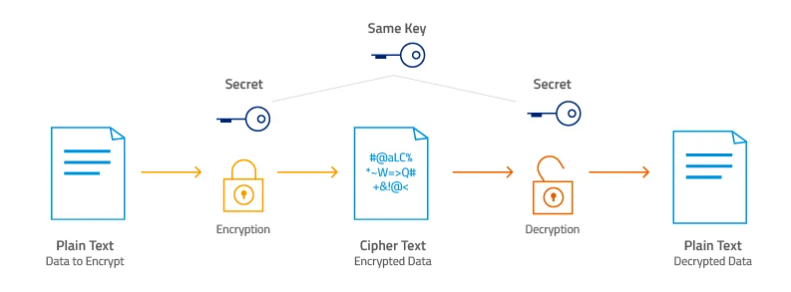
Think of encryption as putting your message into a locked box before sending it across the internet. Once locked, the contents look like random noise—completely unreadable to anyone who doesn’t have the key. The more advanced the encryption, the tougher it is for outsiders to crack that box open or make any sense of what’s inside.
Decryption, on the other hand, is like unlocking that box with the right key and pulling out the original message, just the way it was before. The scrambled version is known as ciphertext, while the readable message is what we call plaintext.
Comparison of hardware and software encryption
When it comes to protecting information, software encryption acts as a reliable guardian of data on logical volumes. When encryption is first launched, the system creates a unique cryptographic key – a kind of “digital lock” that is stored in the device’s memory. But to open this lock, you need a “key” from the user – a password phrase that the owner himself comes up with. Only after entering it, the encryption key is activated and provides access to encrypted information. Interestingly, a copy of the key can be stored directly on the drive itself to simplify access if the system is configured correctly.
Essentially, software encryption becomes an intermediary between data reading and writing operations and the physical disk. Everything that is sent to the disk is first encrypted, and when read, it is decrypted. This circular process makes direct access to the disk contents impossible without the necessary key. This approach guarantees that even if the drive falls into the wrong hands, it will be impossible to read the data without the key. But this method also has its weaknesses. Firstly, all encryption and decryption occurs through the computer’s processor. This means that with large amounts of data or heavy tasks, you may notice how the system works slower – especially on older hardware. Secondly, the effectiveness of protection directly depends on the reliability of the system itself: if an intruder guesses a password or exploits a vulnerability in the code, encryption ceases to be an obstacle.
Attacks during boot are especially dangerous. The fact is that at this stage, the encryption key is temporarily stored in RAM. Hackers using low-level methods can try to intercept it at this moment. This window of opportunity is very short, but still real. Thus, software encryption is not a panacea, but an element of an overall security strategy. It is great as an affordable solution for most users, but it requires attention and understanding of the risks. Strong passwords, updated software, and physical protection of the device are all critical to maintaining data privacy.
Self-encrypting drives (SED): next-generation data protection. Self-encrypting drives, or SEDs, are a true engineering marvel in the world of data storage. These drives have a special chip built into them that uses the AES encryption algorithm, which automatically protects all information. Everything happens at the hardware level: data is encrypted before it is written to the disk and decrypted instantly when read. Moreover, all this is done without the involvement of the operating system and BIOS, which makes the work completely autonomous and safe. When you first set up such a drive, a unique encryption key is created. It is stored directly in the internal memory of the device – in the same NAND chip where your files live. When the computer boots, the BIOS asks for a password. Enter it correctly – and both the system and all your documents are open to you. If you make a mistake, there will be no access at all.
SED drives work in real time. They encrypt and decrypt data on the fly, thanks to the built-in crypto module. The central processor does not get stressed — the entire encryption process is completely taken out of it. This means that your system does not lose speed and performance, unlike software solutions, where the load falls on the CPU.
In addition, the encryption keys never leave the device. They are hidden deep inside the SSD, which means they are protected from most types of attacks, including low-level intrusions. All this makes SED not only an effective means of protection, but also a convenient tool: you just work as usual, and the protection is always and everywhere on — and it is impossible to turn it off. This approach guarantees the highest level of security without unnecessary fuss. SED is your quiet but reliable bodyguard in the digital world.
History of AES encryption
Listen, you have no idea, but you have a digital bodyguard — and he’s cooler than you think.
Seriously. His name is AES, and you’ve probably never heard of him. But he’s there. Always. Every day. And he’s doing an important job — protecting everything on your phone, your computer, and the internet. Silently. Without any show-offs. Without any “allow-access.” He just does his job.
AES is a thing that encrypts. Imagine this: you send a message to a friend or pay your utility bills through an app — and at that moment, AES turns your information into a set of incomprehensible symbols. So that no one, absolutely no one, except the recipient can read it. Even if they intercept it. Even if they steal it.
And here’s what’s cool: you’re already using it without even knowing it.
- Downloaded an archive with a password? AES is inside.
- Connected to a 1хVPN? Greetings from AES.
- Opened WhatsApp, Signal, Telegram? AES is already encrypting your correspondence.
- Logged into your online bank? Aha — it’s him again.
He’s like a good bartender in a quiet bar: he doesn’t butt into the conversation, he just does his job so that everyone can relax.
For developers, AES is like a Swiss army knife. It can be embedded into applications in any language: Java, Python, C, whatever. This means that both large companies and small startups can add protection in just a couple of lines of code. Simple, reliable, proven over the years.
But wait, that’s not all (yes, I sounded like an ad, but wait). Did you know that AES is even “sewn” into the processor of your laptop? Modern chips can encrypt data on the fly — without slowing down, without straining. You can have an ordinary laptop, but inside it is a super-defender working around the clock.
And this is not only about banks and instant messengers. Even games like GTA IV use AES to combat cheaters. And archivers like WinRAR and 7-Zip use it to prevent anyone from opening your encrypted files.
And here’s what: If you use a password manager like 1Password, Bitwarden, or even the one built into your browser, know that all your logins, cards, and accesses are hidden under a very secure digital lock. And this lock is called AES. It has no cracks that you can peek into. Only you can open it.
In short, it’s like a seat belt, only for your data. You don’t think about it every day, you don’t feel it working, but when something goes wrong, it saves you. And here’s what’s important: AES doesn’t ask for your attention. It doesn’t pop up, it doesn’t bother you, it doesn’t require a subscription. It’s just on. It works. It keeps your photos, messages, payments, passwords safe.
Yes, there are a lot of digital risks in the world. But it’s nice to know that you have this thing behind you. A quiet, reliable guard. No salary. No days off. AES. It’s just there. And that’s good.
256-bit hardware encryption using the AES protocol
When you hear words like “256-bit symmetric block encryption algorithm”, you want to immediately close the tab and go have some tea. But wait. Now I’ll tell you in human terms – without tediousness, terms and words that sound like they were invented by a robot.
Imagine…
You write down something important in a diary. Very personal. Maybe your dreams. Maybe the password to your bitcoin wallet. Or a declaration of love. Now imagine that you need to send this diary to someone – and you want to be absolutely sure that no one except the recipient can read it. Even if they intercept it.
This is where AES-256 comes in. It’s as if you put your diary in a box, wrapped it in chains, locked it, then locked it again, and 14 more times. And in such a way that each lock opens only in the right sequence. Miss even one step – that’s it, you will never open it.
What is AES-256 without scary words
AES is just a way to turn readable text into a mess. Encryption. And very powerful. “256” is the length of the key. Like a PIN code, only not 4 digits, but a combination that is impossible to brute force even in billions of years. No joke.
While an ordinary lock can be picked with a master key, AES-256 is like a locked door in a parallel universe that you can’t even find without a map. Even if you are a villain with a supercomputer and an evil genius.
Why it works
2 to the 256th power. This is not just a lot – it is impossible to imagine. So many combinations that even if every inhabitant of the Earth guesses the key every nanosecond, we will all guess together until the end of the Universe and beyond. 14 stages of encryption. Each step complicates everything even more. It’s like multi-layered armor, but for text. And the main thing is that no one has been able to crack AES-256 yet. No one. Ever. Even with the quantum computers that everyone is scared of.
Key Length vs Possible Combinations
Where is Advanced Encryption Standard (AES) used?
You don’t even know it, but AES has been with you for a long time — and that’s great. You’ve probably never typed “Advanced Encryption Standard” into Google — and rightly so, there’s no need. But here’s what’s interesting: this same AES — one of the most reliable and proven methods of data protection in the world — has been confidently helping you every day for a long time. Silently. Without unnecessary pathos.
It encrypts. That is, it makes information unreadable for strangers. And it does it so reliably that even if someone intercepts your data, they will only see gibberish. Without a key — no chance.
Where do you encounter it? Almost everywhere. Opened a banking app, transferred money to a friend? AES encrypted the transaction. Downloaded an archive with a password? It’s there too. Turned on a VPN? It’s him again. Sent a message on WhatsApp? Greetings from AES. It’s like a digital bodyguard that goes with you through life, even if you’ve never heard of it. For developers, AES is a godsend. It can be embedded into C, Java, Python, and even JavaScript code. If you want to protect your data in an application, go ahead. No secret protocols, just take it and use it. It’s a standard supported at the state level, and at the same time freely available.
And now, an interesting fact that will surprise many: AES can protect not only banking data, but also games and archives. Programs like 7-Zip, WinRAR, and WinZip use it to prevent anyone from getting into your archive. And in games, for example, in the same GTA IV, it works as protection against hacking. Even here, it is needed to keep everything honest.
The Windows file system (NTFS) can use AES right at the storage level. And things like BitLocker or FileVault encrypt entire disks with its help. If someone physically steals your laptop, there is zero chance of getting to your data without a password.
Now look at it from another angle: your processor already knows how to speed up AES. Modern Intel and AMD chips support AES-NI — special commands that make encryption very fast. Everything is encrypted on the fly. Transparently. Without delays. It just works. Password managers? Your entire digital life — access to mail, social networks, banks — is under lock and key, secured with AES. Even if the database falls into the wrong hands, it will be impossible to hack it. Only with a key. And only you have the key.
Messengers? WhatsApp, Signal, Telegram — they don’t read your messages. Not because they don’t want to, but because they can’t. Because everything is encrypted in such a way that decryption is impossible without the right key. And all this — without your participation. You don’t need to run a script, press a button or understand cryptography. Everything is already built in. It works. It protects.
Understanding how AES works gives you peace of mind. It’s not magic, it’s not spyware, it’s not “something from IT”. It’s real, living technology that helps each of us. Every day. And there’s something really cool about that.
Software encryption using TCG Opal 2.0 protocol
The Trusted Computing Group (TCG) is a prominent international organization committed to establishing standards for hardware-based trusted computing platforms. This protocol plays a crucial role in enabling the initialization, authentication, and management of encrypted solid-state drives (SSDs). It does so by partnering with various independent software vendors that utilize TCG Opal 2.0 security solutions, including well-known companies like Symantec™, McAfee™, and WinMagic®.
While software encryption certainly has its advantages, it may fall short of offering a truly comprehensive security solution. This form of encryption requires multiple steps, as data must first be encrypted and then decrypted whenever access is necessary. In contrast, hardware-based encryption delivers a more robust and reliable option. SSDs that come equipped with hardware encryption are specifically designed to integrate seamlessly with the rest of the system, ensuring no decline in performance or speed.
Depending on your specific applications, you might be surprised by the various components involved in safeguarding your sensitive data. It’s important to note that not all encryption methods are created equal. Understanding the differences between them will play a crucial role in determining how effective and efficient your overall security measures are.