Ransomware attacks have become truly alarming in recent years, affecting both businesses and governments around the world. Suddenly falling victim to such attacks, organizations are faced with an agonizing choice: risk losing critical data or give in to the attackers’ demands and pay a large ransom. But even if they pay, there is no guarantee that access to the information will actually be restored — cybercriminals are rarely honest.
For those who have already become a target, it is often too late — some systems may be completely blocked, and data may be irretrievably lost. This inevitably entails the suspension of work processes, serious losses, and loss of trust from customers or citizens. But the good news is that disaster can be prevented in advance.
The key to effective protection is advance preparation. One of the most reliable and proven ways to protect your digital resources is the “3-2-1” backup strategy. Simple at first glance, it has actually saved more than one organization from total data loss. Its essence is as follows: have three copies of data, two of which are stored on different media, and one is outside the main office, in an isolated storage. This approach minimizes risks and allows you to quickly restore work even after a serious attack. In this article, we will examine in detail how exactly the “3-2-1” method works, and why its implementation is one of the most sensible and timely decisions that a modern organization that values its data and reputation can make.

- What’s the 3-2-1 Backup Rule—and Why It Might Save You One Day
- Recognizing Data that Needs Protection
- Three copies of data — because one is always at risk
- Two different media — don’t put all your eggs in one basket
- One copy outside the office — in case everything collapses
- Why does this really work?
- Investing in proper backups can prevent costly losses
What’s the 3-2-1 Backup Rule—and Why It Might Save You One Day
Let’s face it—no one thinks about backups until something goes horribly wrong. A fried laptop. A ransomware attack. A spilled coffee. Suddenly, those photos, that novel draft, or your entire work project… gone.
That’s where the 3-2-1 backup rule comes in. It’s not some dry IT concept—it’s a simple, lifesaving habit anyone can follow:
- 3 copies of your data. That means the original file, plus two backups. Why? Because one copy is never enough. Things fail. Drives die. Cloud services glitch. With three copies, you’ve got breathing room.
- 2 different kinds of storage. Don’t put all your eggs in one digital basket. Maybe you keep one backup on your computer and another on an external SSD or even a NAS drive. The key is diversifying, so a single malfunction doesn’t take down your entire digital life.
- 1 copy stored off-site. This is your ace in the hole. A backup kept away from your home or office—somewhere the same fire, flood, or theft can’t touch. Think cloud storage (if encrypted), a friend’s house, or even a secure offline drive in another location.
Why go to all this trouble? Because disasters don’t send calendar invites. One day, without warning, you might need that safety net. And if you’ve followed the 3-2-1 rule, you’ll be the calm person in the chaos—restoring everything like it’s no big deal.
Oh, and here’s one more tip: test your backups once in a while. A backup that doesn’t work when you need it is just a false sense of security. Bottom line? The 3-2-1 method isn’t just smart—it’s peace of mind in a chaotic world. Think of it as future-you giving current-you a high five.
Recognizing Data that Needs Protection
Not every piece of data requires intense backup measures. Begin by identifying the most crucial files that could disrupt your operations or compromise your security if breached. Organize these files and prioritize their safeguarding to effectively apply a “3-2-1” strategy for those that are most vulnerable:
- Confidential Information: Data that cannot be easily recreated or recovered.
- Critical Operational Data: Files vital for daily business functions.
- Legally Mandated Data: Information that must be protected to meet legal and regulatory obligations.
How the 3-2-1 Strategy Helps You Avoid Losing Everything If Encryption Appears at Your Door
Ransomware is like a house on fire: it comes out of the blue, burns everything, and doesn’t ask for permission. One awkward click on an email, and all your files, including backups, are locked away. What to do? A reliable solution has been around for a long time, and it’s called the 3-2-1 strategy.
A simple formula that could one day save you a ton of stress, time, and money. Let’s take a human look at how it works and why this strategy is still considered the best.
Three copies of data — because one is always at risk
The first and most important thing: one copy of data is not enough. Not in the office, not at home, nowhere. Ideally, you should have three versions — the original and two backups. Why is that? Because equipment breaks down, people make mistakes, viruses encrypt.
One copy can go bad, the second can become infected. But the third one, if done correctly, is your safety cushion. You can breathe easy with it, even if everything else goes to hell.
Two different media — don’t put all your eggs in one basket
You don’t store money in just one currency, right? The same story with data. One backup copy — say, on the server, the second — on an external SSD or even on a NAS.
Why is this important? If, for example, the server burns out or “freezes” forever, you won’t be left empty-handed. Different devices break down in different ways — and not always at the same time.
One copy outside the office — in case everything collapses
This is where the fun begins. Even if you have excellent copies and super-reliable media, all of this can be destroyed by one virus if it’s on the same network. That’s why one of the backup copies should be physically outside the network and preferably outside the office.
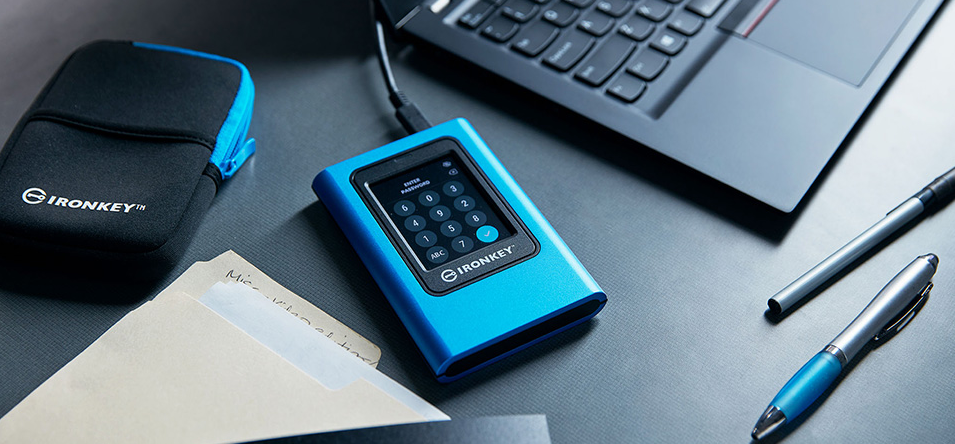
The ideal option is an external drive with hardware encryption that you do not connect to the Internet at all. For example, Kingston IronKey is as reliable as a safe. Connect, save, disconnect. That’s it. Even if you are hacked, they will not get to this data.
Why does this really work?
Because the “3-2-1” strategy does not allow viruses and failures to get the better of you. It is like life insurance – you do not expect that trouble will happen, but if it does, you are ready. And most importantly – you can quickly restore work without panicking and running around the office with a flash drive in search of “something that survived.”
The main thing to remember:
- Keep 3 copies of your data
- On 2 different types of media
- And 1 copy – outside the network and office
Investing in proper backups can prevent costly losses
The 3-2-1 backup strategy does a lot more than just boost your data protection policies—it can seriously cut costs when ransomware strikes. By backing up your data on a set schedule, whether that’s every day or once a week, your business can greatly reduce the chances of losing important files. And when things go sideways, you’re not stuck scrambling. Your backups are recent, your files are safe, and you can breathe a little easier knowing recovery won’t mean starting from scratch.
From a financial standpoint, the advantages are crystal clear. Putting money into secure and reliable backup systems now can save you from paying outrageous ransoms later. But the impact isn’t just about dodging ransom notes. Having a smart, forward-thinking backup plan means less risk of long downtimes, fewer legal troubles, and no last-minute panic calls to IT just to keep your business afloat.
Smaller companies often face an uphill battle. They don’t always have dedicated cybersecurity staff or access to the kind of high-end tools big corporations use every day. That gap leaves them wide open to attacks—and when disaster hits, it can do damage that’s not just painful, but permanent. Without a solid backup strategy, bouncing back might not even be possible. That’s why the 3-2-1 approach is more than just a technical best practice. It’s a way to keep your operations running smoothly and your business reputation intact. A strong, layered backup system doesn’t just sit in the background—it quietly powers your resilience. With it, you’re ready to handle even the nastiest cyber threats and keep your future protected, one smart backup at a time.